Saturday, 23 May 2020

Saturday, 10 February 2018
List Interface
List interface::
An ordered collection (also known as a sequence). The user of this interface has precise control over where in the list each element is inserted. The user can access elements by their integer index (position in the list), and search for elements in the list.
The List interface places additional stipulations, beyond those specified in the Collection interface, on the contracts of the iterator, add, remove, equals, and hashCode methods. Declarations for other inherited methods are also included here for convenience.
The List interface provides four methods for positional (indexed) access to list elements. Lists (like Java arrays) are zero based. Note that these operations may execute in time proportional to the index value for some implementations (the LinkedList class, for example). Thus, iterating over the elements in a list is typically preferable to indexing through it if the caller does not know the implementation.
The List interface provides a special iterator, called a ListIterator, that allows element insertion and replacement, and bidirectional access in addition to the normal operations that the Iterator interface provides. A method is provided to obtain a list iterator that starts at a specified position in the list.
ArrayList::
Resizable-array implementation of the List interface. Implements all optional list operations, and permits all elements, including null. In addition to implementing the List interface, this class provides methods to manipulate the size of the array that is used internally to store the list. (This class is roughly equivalent to Vector, except that it is unsynchronized.)
The size, isEmpty, get, set, iterator, and listIterator operations run in constant time. The add operation runs in amortized constant time, that is, adding n elements requires O(n) time. All of the other operations run in linear time (roughly speaking). The constant factor is low compared to that for the LinkedList implementation.
Each ArrayList instance has a capacity. The capacity is the size of the array used to store the elements in the list. It is always at least as large as the list size. As elements are added to an ArrayList, its capacity grows automatically. The details of the growth policy are not specified beyond the fact that adding an element has constant amortized time cost.
How to create Arraylist:
public class LstStrm {
public static void main(String args[]) {
//declare both right and left generics in <> in java6
List<String> names=new ArrayList<String>();
names.add("one");
names.add("two");
names.add("three");
names.add("four");
names.add("five");
System.out.println(" display list of elements in java6 ::"+names);
// in java7you can't declare generics in right side <> ,compiler infers the left hand generic which type it is.
List<String> names=new ArrayList<>();
names.add("one");
names.add("two");
names.add("three");
names.add("four");
names.add("five");
System.out.println(" display list of elements in java7 ::"+names);
}
}
LinkedList::
Linked list implementation of the List interface. Implements all optional list operations, and permits all elements (including null). In addition to implementing the List interface, the LinkedList class provides uniformly named methods to get, remove and insert an element at the beginning and end of the list.By using this you can add elements in both forward and backward,also add elements using while iterating elements.
LinkedList<String> namesList=new LinkedList<>();
namesList.add("one");
namesList.add("two");
namesList.add("three");
namesList.add("four");
namesList.add("five");
namesList.addFirst("first");
namesList.addLast("lastele");
System.out.println(" display list of elements in java6 ::"+namesList);
Tuesday, 16 January 2018
Overriding in java
Overriding :: When a method in a sub class has same name, same number of arguments and same type signature as a method in its super class, then the method is known as overridden method. Method overriding is also referred to as runtime polymorphism. The key benefit of overriding is the abitility to define method that's specific to a particular subclass type.
- The access level cannot be more restrictive than the overridden method’s access level. For example: if the super class method is declared public then the overridding method in the sub class cannot be either private or protected.
- Instance methods can be overridden only if they are inherited by the subclass.
- A method declared final cannot be overridden.
- A method declared static cannot be overridden but can be re-declared.
- A subclass within the same package as the instance’s superclass can override any superclass method that is not declared private or final.
- Constructors cannot be overridden.
Example of override method:

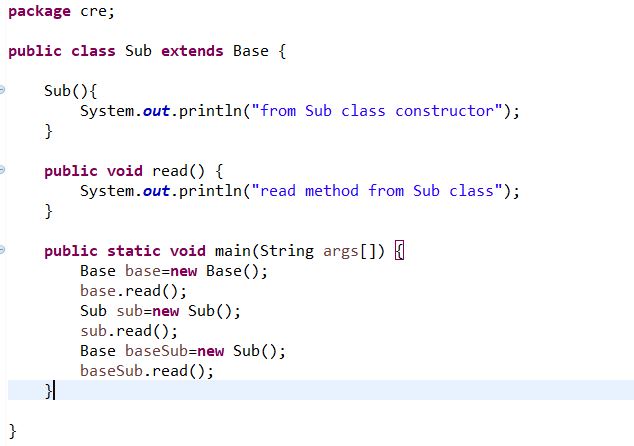

When we commnet Base baseSub=new Sub(); and copy below code exceute it will show classcastexception.Sub subBase=(Sub) new Base();
subBase.read();
O/p:

Private and final methods cannot be overridden.
Can we override staticmethod? think about it before scrolling down.
When you defines a static method with same signature as a static method in base class, it is known as method hiding.
The following table summarizes what happens when you define a method with the same signature as a method in a super-class.
| SUPERCLASS INSTANCE METHOD | SUPERCLASS STATIC METHOD | |
|---|---|---|
| SUBCLASS INSTANCE METHOD | Overrides | Generates a compile-time error |
| SUBCLASS STATIC METHOD | Generates a compile-time error | Hides |
in above base class you can add the static keyword infront of void read method()And trying ot create instance method name(read) in sub it will displays following error.

in above Sub class you can add the static keyword infront of void read method()And trying ot create instance method name(read) in Base class it will displays following error.

Method overriding with Exception handling ::1)If the superclass method does not declare an exception, subclass overridden method cannot declare the checked exception but it can declare unchecked exception.
Base class:
public class Base {
Base(){
System.out.println("from base class constructor");
}
public void read() {
System.out.println("read method from base class");
}
}
Subclass:
public class Sub extends Base {
Sub(){
System.out.println("from Sub class constructor");
}
/*public void read() throws ClassCastException {
System.out.println("read method from Sub class");
}
*/
//it will show Exception IOException is not compatible with throws clause in Base.read()
public void read() throws IOException {
System.out.println("read method from Sub class");
}
public static void main(String args[]) {
Base base=new Base();
base.read();
Sub sub=new Sub();
sub.read();
Base baseSub=new Sub();
//Sub subBase=(Sub) new Base();
baseSub.read();
}
}
you can uncomment above commented lines and commented currently showing exception method.
public class Base {
public void read() throws IOException {
System.out.println("read method from base class");
}
}
public class Sub extends Base {
//it does not throw any exception
public void read() throws EOFException {
System.out.println("read method from Sub class");
}
}
public class Sub1 extends Base {
//it does not throw any exception
public void read() { System.out.println("read method from Sub class"); }
}
public class Sub2 extends Base {
//it does throw compilation error as per above rule
public void read() throws Exception { System.out.println("read method from Sub class"); }
}
Sunday, 7 January 2018
Static block vs initialization block
Static Initialization blocks :: This is also referred as “static blocks” or “static initializer”.Static blocks are bundle of valid Java statements within {curly braces} prefixed with static keyword.
syntax: static { //your code goes here}
Static blocks are executed, at the time of class loading.Executed only once, at the time class loading.
Static blocks can be used to initialize static data members and invoke static methods only.
Since static blocks are belongs to class, this and super keywords are not allowed.
Order of execution: Static blocks are always executed first comparing with instance blocks, at the time class loading.
package utlfunc;
public class GraspStatc {
public GraspStatc() {
System.out.println("from GraspStatc constructor ");
}
static {
System.out.println("from static blcok1");
}
{
System.out.println("from initialization block1");
}
static {
System.out.println("from static blcok2");
}
{
System.out.println("from initialization block2");
}
public static void main(String[] args) {
GraspStatc gs=new GraspStatc();
}
}
order of execution of blocks in class: 1)while classloading static block will execute first.
2) Second initialization block will execute.
3)constructor will execute.
Output:

Inheritance hierarchy::
SubClass as above example.Super class below
package utlfunc;
public class SubStatcInit {
public SubStatcInit() {
System.out.println(" From SubStatcInit() constructor");
}
static {
System.out.println("from static blcok1 from SubStatcInit");
}
{
System.out.println("from initialization block1 from SubStatcInit");
}
static {
System.out.println("from static blcok2 from SubStatcInit");
}
{
System.out.println("from initialization block2 from SubStatcInit");
}
}
Output::

Saturday, 6 January 2018
Function interface in util package
Function Interface::
Represents a function that accepts one argument and produces a result.
This is a functional interface whose functional method is
apply(Object).BiFunction<T,U,R>
Represents a function that accepts two arguments and produces a result. This is the two-arity specialization of
Please refer below link for more inforamation:
https://docs.oracle.com/javase/8/docs/api/java/util/function/package-summary.html
package utlfunc;
import java.util.function.BiFunction;
import java.util.function.DoubleFunction;
import java.util.function.Function;
import java.util.function.IntFunction;
import java.util.function.LongFunction;
public class GraspFucnIntrface {
public static void main(String[] args) {
Function<Integer, Integer> fnction=(x)->checkInt(x);
System.out.println("Function:: checkInt() " + fnction.apply(6));
Function<Integer, Integer> fnctionExp=(x)-> {return x;};
fnctionExp.andThen(fnction).apply(8);
BiFunction<String, Integer,Boolean> biFucntion=(x,y)->checkStiringEmpty(x, y);
System.out.println("from BIFUNCTION() ::checkStiringEmpty():" + biFucntion.apply("functioninterface", 12));
IntFunction<Integer> fnctionInt=(x)->checkInt(x);
System.out.println("Function:: checkInt() " + fnctionInt.apply(6));
LongFunction<Long> fnctionLng=(x)->checkLng(x);
System.out.println("Function:: checkLng() " + fnctionLng.apply(6l));
DoubleFunction<Double> fnctionDbl=(x)->checkDbl(x);
System.out.println("Function:: checkLng() " + fnctionDbl.apply(6.0));
}
public static boolean checkStiringEmpty(String check,int b) {
return check.length()>0 && b>0?true:false;
}
public static int checkInt(int b) {
return b;
}
public static Long checkLng(long b) {
return b;
}
public static Double checkDbl(Double b) {
return b;
}
}

Function.
This is a functional interface whose functional method is
apply(Object, Object).https://docs.oracle.com/javase/8/docs/api/java/util/function/package-summary.html
import java.util.function.BiFunction;
import java.util.function.DoubleFunction;
import java.util.function.Function;
import java.util.function.IntFunction;
import java.util.function.LongFunction;
public class GraspFucnIntrface {
public static void main(String[] args) {
Function<Integer, Integer> fnction=(x)->checkInt(x);
System.out.println("Function:: checkInt() " + fnction.apply(6));
Function<Integer, Integer> fnctionExp=(x)-> {return x;};
fnctionExp.andThen(fnction).apply(8);
BiFunction<String, Integer,Boolean> biFucntion=(x,y)->checkStiringEmpty(x, y);
System.out.println("from BIFUNCTION() ::checkStiringEmpty():" + biFucntion.apply("functioninterface", 12));
IntFunction<Integer> fnctionInt=(x)->checkInt(x);
System.out.println("Function:: checkInt() " + fnctionInt.apply(6));
LongFunction<Long> fnctionLng=(x)->checkLng(x);
System.out.println("Function:: checkLng() " + fnctionLng.apply(6l));
DoubleFunction<Double> fnctionDbl=(x)->checkDbl(x);
System.out.println("Function:: checkLng() " + fnctionDbl.apply(6.0));
}
public static boolean checkStiringEmpty(String check,int b) {
return check.length()>0 && b>0?true:false;
}
public static int checkInt(int b) {
return b;
}
public static Long checkLng(long b) {
return b;
}
public static Double checkDbl(Double b) {
return b;
}
}
Output ::

Supplier functional interface
Supplier Functional interface:Represents a supplier of results.
There is no requirement that a new or distinct result be returned each time the supplier is invoked.This is a functional interface whose functional method is get().
please refer below link for more inforamation:
https://docs.oracle.com/javase/8/docs/api/java/util/function/package-summary.html
import java.util.function.DoubleSupplier;
import java.util.function.IntSupplier;
import java.util.function.LongSupplier;
import java.util.function.Supplier;
public class GasapSuplier {
public static void main(String[] args) {
Supplier<String> splier=()->{ return display("from supplier");};
System.out.println("suign get() from supplier inteface" +splier.get());
IntSupplier splierInt=()->{return displayWihtInt(345);};
splierInt.getAsInt();
DoubleSupplier splierDble=()->{return displayWihtDble(345.00);};
splierDble.getAsDouble();
LongSupplier splierLng=()->{return displayWihtLng(345l);};
splierLng.getAsLong();
}
public static String display(String message) {
System.out.println(" dislayign messgae from ::display() " + message);
return message;
}
public static int displayWihtInt(int abc) {
System.out.println(" dislayign messgae from ::displayWihtInt() " + abc);
return abc;
}
public static double displayWihtDble(double abc) {
System.out.println(" dislayign messgae from ::displayWihtDble() " + abc);
return abc;
}
public static Long displayWihtLng(Long abc) {
System.out.println(" dislayign messgae from ::displayWihtLng()" + abc);
return abc;
}
}
Output:

Predicate Interface
Predicate interface :
Represents a predicate (boolean-valued function) of one argument.This is a functional interface whose functional method is
test(Object).please refer below link for more inforamation:
https://docs.oracle.com/javase/8/docs/api/java/util/function/package-summary.html
package utlfunc;
import java.util.function.BiPredicate;
import java.util.function.IntPredicate;
import java.util.function.LongPredicate;
import java.util.function.Predicate;
public class GraspPrdicate {
public static void main(String[] args) {
Predicate<String> prdcate= (check)->checkStiringEmpty(check);
System.out.println(prdcate.test("from predicate"));
BiPredicate<String , Integer> biPrdcate=(a,c)->checkStiringEmpty(a, c);
System.out.println(biPrdcate.test(" from Bipredicaate", 345));
BiPredicate<Integer,Integer> expBiPrdcate=(x,y)->x>y;
BiPredicate<Integer,Integer> expOnePrdcate=(x,y)->x-2>y;
System.out.println(expBiPrdcate.and(expOnePrdcate).test(10, 5));
System.out.println(expBiPrdcate.or(expOnePrdcate).test(6,7));
IntPredicate prdcateInt=(x)->checkInt(x);
prdcateInt.test(234);
IntPredicate prdciateTest=(y)->y>1;
System.out.println(prdciateTest.test(21));
System.out.println(prdciateTest.and(prdcateInt).test(23));
System.out.println(prdciateTest.or(prdcateInt).test(23));
LongPredicate lngPrdcate=(y)->checkLng(y);
System.out.println(lngPrdcate.test(21l));
}
public static boolean checkStiringEmpty(String check) {
return check.length()>0?true:false;
}
public static boolean checkStiringEmpty(String check,int b) {
return check.length()>0 && b>0?true:false;
}
public static boolean checkInt(int a) {
return a>0?true:false;
}
public static boolean checkLng(Long a) {
return a>0?true:false;
}
}
Subscribe to:
Posts (Atom)